

One login. All your machines. Kept separate. Here's how the pieces fit together — before you sign up.
DataStun isn't a one-device app. Most people have more than one machine to look after — a laptop and a couple of desktops, the family's computers, maybe a company fleet. One DataStun login covers all of it, organized into separate spaces called tenants — your personal devices in one, the company's in another — that never mix.
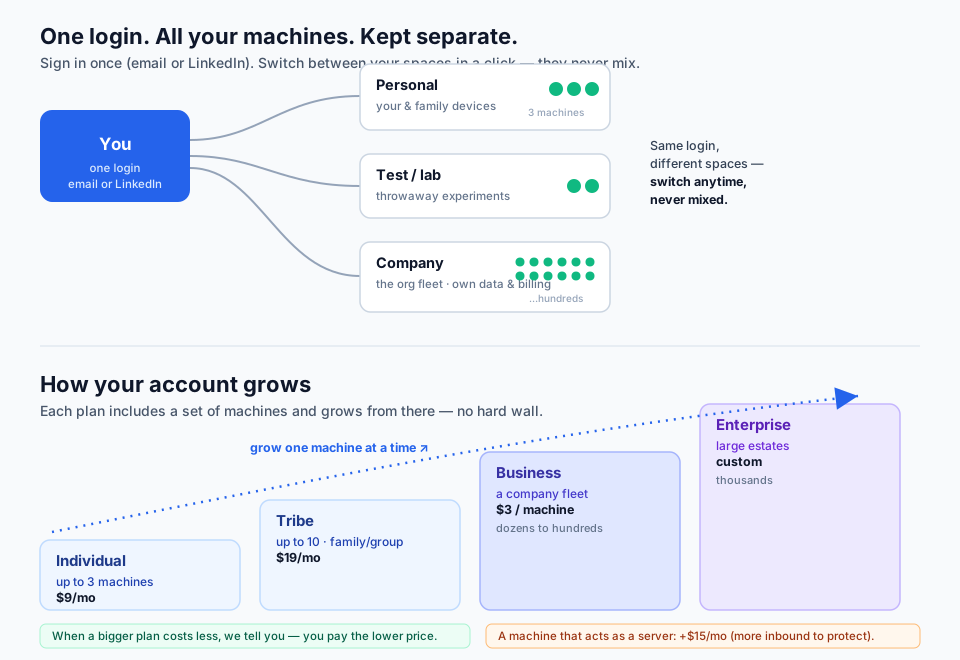
 Packetman saysPacketman here. A tenant is a walled space: its people, its devices, its findings. Nobody outside it can see in, and every query the platform runs is scoped to one tenant. An individual, a family, a business, an enterprise, and a managed-service provider with clients are all the same architecture, differing in size, seats, and features. The one thing shared is reputation: an address or a file gets vetted once, and the verdict reaches every tenant. Your data stays yours; the lesson goes to everyone.
A tenant is a walled space with its own people, its own agents, and its own findings. Every kind of customer is a tenant built on the same architecture — what changes from one kind to the next is size, seats, retention, and which advanced features are switched on, not how the space is built or protected.
One per tenant. Holds the account, the billing relationship, and the power to name admins or hand the tenant to a managed-service provider — and to take it back.
Runs the fleet day to day: enrolls agents, reads every device, sets policy, blocks and unblocks, issues diagnostics, answers escalated support. As many as your tier seats allow — one central team, or one per site or business unit.
Reads the dashboards without the keys to change them. The seat for the manager, the auditor, or the analyst who needs to see but not to act.
Below the roles sits the person whose device it is: the tray or Dock opens their own device’s page, minted with a token that reaches one device and nothing else. Every access decision is resolved per request in one place — direct membership first, then a parent organization’s standing, then our own staff for support — and the source of the access is recorded with the action. The end-user view →
One person’s devices, or a family or small team’s. Same agent, same protection, same walled space as the largest enterprise; smaller caps on devices and seats, shorter history.
A company fleet, then many sites and business units. Unlimited devices, more seats, longer history, and the fleet-wide features — SI governance, fleet analytics, alerts into your tooling, compliance evidence.
A provider’s tenant can sit above client tenants. Each client remains its own walled space with its own owner; the provider’s admins act on it as admins, never as owner. Attaching needs both sides to agree; leaving is the client’s right alone. One provider holds delegated responsibility at a time, and the owner can seat individual specialists from another firm alongside it.
Sites and business units inside one organization use the same shape: a child tenant, or a tagged scope, with its own admins and its own view, rolled up to the parent. What each tier includes →
Your devices, your flows, the names your machines looked up, your people, your alerts, your inventory, your validation results. Every one of those records carries its tenant, every agent and key belongs to exactly one tenant, and every query the platform runs is scoped before it touches data. No tenant can see another’s.
The reputation of an address or a file. That is a statement about the address, not about you, so it lives in a global service that holds no tenant’s data at all. When any device anywhere reaches a new address, it is vetted once; a bad verdict lands on the blocklist that every tenant’s agents enforce within about a minute. What one tenant’s device learned, every tenant’s devices know.
A tenant can allow an address for its own agents without changing the global verdict or touching any other tenant, and can dispute a block through the attribution every entry carries. Global where the fact is global; local where the choice is yours.
Today we host one multi-tenant platform for everyone. The same code is built so that its pieces — the platform, the external validator, the reputation service — can run inside an organization’s own environment. That is not a roadmap slide; it is in the code: a tenant can be relocated to another platform address and every agent follows on its next check-in (that is how our own fleet moved domains in a minute); a tenant’s admins can already mint the credential for a validator they run themselves; the reputation service is written to be one of several, with a directory of trusted instances and a license check that carries your tier with you. What is not done is the packaging and the price. When an organization needs its data on its own servers, the architecture is already there.
DataStun isn’t a dashboard with alarms bolted on. It’s a set of forensic methods — built over four decades of packet-level breach work by our founding team — turned into a product you run yourself.
The whole platform rests on one idea our team learned the hard way, walking into breach after breach: the network is the witness. A vendor dashboard shows you what it was built to show. The packets show you what actually crossed the wire. DataStun reads the wire and reports what it finds — for every machine you put an agent on.
An agent is an endpoint — one of your computers, servers, or workstations. You install a small agent on each one, and from then on that machine is a witness too: it watches its own traffic and reports up.
The work happens where the risk is. Rather than hauling every machine’s traffic to a central box that has to see everyone at once, each endpoint does the first-hand work for itself — watching its own connections, naming the program behind each one, reading its own health counters, and enforcing the blocklist in its own firewall. That is small work for one machine on hardware you already own. The central platform does only what needs doing once for everyone — vetting a destination, checking a file, correlating across the fleet — and reports. Distributed monitoring and enforcement, central reporting.
Security and performance are cousins. Many security events show up first as a performance complaint — exfiltration looks like a slow upload, a compromised host probing its neighbors looks like retransmits, a miner looks like a hot laptop. Every session record here carries both the performance reading and the program and destination behind it, so a slowdown and a security finding are often the same row read two ways. That is why one agent does both jobs rather than two tools that never compare notes. When slow is a symptom →
For every connection a machine makes, DataStun resolves the full program path on disk — not just a process number. Malware tends to announce itself by its own filename, and the same method surfaces lateral movement by which executable fanned out across your fleet, not just which device. That comes straight from breach forensics.
We read destination, program, byte counts, and timing — never the content of your traffic, no deep inspection, no decryption. It’s a deliberate discipline: small enough that nobody has to trust us with your content, rich enough to flag a program quietly beaconing out of a temp directory.
What each agent passively observes on its own machine, and what our reputation system actively probes from the outside, stay separate evidence tracks. Two independent witnesses corroborate each other; they don’t get blended into one.
Three machines — a laptop, a desktop and a Mac — and they don't have to share a roof. Mom's laptop in one city, Dad's desktop in another, Grandma's Mac across the country: one plan covers all three, wherever they are. Any mix of Windows, macOS and Linux.

Need a fourth machine? Tribe takes you to 33 at $2 each, and when a different plan would cost you less, we tell you, so you only ever pay the lower price.
Some machines are servers — they answer requests from the open internet instead of just reaching out. Those take more work to protect (a server is under constant probing), so on Business a machine you confirm as a server is priced as a Standard Server at $15/month, or an Advanced Server at $30/month when you mark it mission-critical — and we always show you why and let you confirm before anything on your bill changes. Individual and Tribe are endpoints only.
Every account has an admin — the person who set it up, or someone they add. The admin looks after all the machines in the account: adding and removing agents, seeing what each one reports, and acting on anything that needs attention.
The admin also owns support for everyone on the account. The people whose computers are protected bring their questions to the admin, who handles the day-to-day — and when something needs us, the admin escalates to DataStun. Support flows the way it should: the person who knows your setup leads, with our team behind them.
DataStun is a managed service you can run yourself. You appoint your own admins, and they manage every agent in your fleet from one console. No outside party is required to get full value.
You can be your own M — your own managed-service provider — or have a professional MSSP run your account for you. The switch goes either direction, and it’s easy and reversible: you don’t re-deploy a single agent to change who’s at the controls.
Management is distributed too, not just the work. “Your admins” can be one central team, or an administrator for each site, department, or business unit with a view of their own machines, rolled up to the parent for the people who need the whole picture. The units paying for the system get to see it, vet it, set priorities for their own part of it, and participate in running it — more eyes, closer to the machines, with the collaboration that a single far-off center cannot give you.
Signing in with LinkedIn is the quickest way in for your personal and family spaces. For a company, set the account up under a company email with a second admin, so the fleet stays with the company, not one person.